November 2026 | Volume 4 | Issue 4 | Previous Issues
Fostering Student Choice and Decision Making
Those who do the work do the learning. If this maxim is true, how can we structure our classrooms so students have the power to make important choices about their learning without creating unnecessary chaos? How can they do more of the work while still relying on us for guidance?
When we give students the opportunity to make decisions about their learning process, they are more likely to form deep connections and practice higher-level thinking skills. According to Deci and Ryan as cited in Stefanou et al. (2004), students need “autonomy, competence, and relatedness…in social contexts” (p. 98) to learn and achieve self-determination. Students must actively construct their learning within intentional, social contexts. Students who feel they have some freedom over their learning are more likely to set “realistic goals, [determine] appropriate actions that accomplish goals, and [assess] progress toward the goals” whereas students who feel powerless to make their own decisions “lack volitional strategies and behaviors” (p. 98).
Impact of choice on autonomy, competence, and relatedness
Autonomy
Autonomy is the need to feel in control of one’s own learning and choices. When students are presented with choices, there can be a shift from feeling controlled to feeling like engaged decision makers. Choice can also be embraced by students if there is the potential to align tasks with personal interests.
Competence
Competence is the need to have mastery over one’s environment and the capability of achieving desired outcomes. By providing choices, students are able to build self-efficacy and their validation becomes more internal, which lessens the importance of external validation.
Relatedness
Relatedness is the psychological need to feel a sense of belonging and connection with others. Choice can yield several benefits from a student perspective, such as the increase in mutual respect associated with a shift away from an autocratic instructor-student dynamic in the classroom; an increase in opportunities for students to share their cultural and personal identities; and indications that their perspectives and individual experiences are valued.
Benefits of offering choices
- Enhances student engagement and intrinsic motivation.
- Encourages cooperation through empowerment.
- Builds responsibility and commitment.
- Increases alignment with students’ interests.
- Increases alignment with students’ career plans.
- Fosters intellectual curiosity and love of lifetime learning.
- Encourages students to approach assignments as a process of discovery and exploration.
- Can help prevent disruptive behaviors.
Considerations for offering choices
Because the types of choices we present to students significantly affect their level of motivation, consider how students might contribute to the choices provided in your class. Additional considerations include:
- Think carefully about the goals of an assignment and how they help students achieve course objectives.
- Make choices you offer clear and specific.
- Do not make student decision making difficult by offering too many options.
- Put an onus on providing thoughtful feedback.
- Use technology to enhance an assignment (e.g., virtual choice board with links).
Student choice strategies
References
Cook, A. (2001). Assessing the use of flexible assessment. Assessment & Evaluation in Higher Education, 26(6), 539–549. https://doi.org/10.1080/02602930120093878
Credé, M., Roch, S. G., & Kieszczynka, U. M. (2010). Class attendance in college: A meta-analytic review of the relationship of class attendance with grades and student characteristics. Review of Educational Research, 80(2), 272-295.
Fleming, E. C. (2023). UDL for inclusive teaching: Offering choice to increase belonging through technology. Journal of Teaching and Learning with Technology, 12(1). https://doi.org/10.14434/jotlt.v12i1.36327
Flores, M., Kehoe, M., & Thompson, C. (2022). Assessment choice and student voice with UDL. The AHEAD Journal, 15. https://www.ahead.ie/journal/Assessment-Choice-and-Student-Voice-with-UDL
Hills, M., & K. Peacock. (2022). Replacing power with flexible structure: Implementing flexible deadlines to improve student learning experiences. Teaching and Learning Inquiry 10. https://doi.org/10.20343/teachlearninqu.10.26
Patton, M. A. (2000). The importance of being flexible with assignment deadlines. Higher Education in Europe, 25(3), 417-423.
Pope, L., Anacker, A. M., Burg, M. B., Dion, L., Plouffe, R. B., Vivanco, L. A., … & Parker, H. B. (2025). Impact of Choice-Based Assessment on Undergraduate Student Engagement, Stress Level, and Self-Efficacy. Journal on Excellence in College Teaching, 36(2).
Rideout, C. A. (2018). Students’ choices and achievement in large undergraduate classes using a novel flexible assessment approach. Assessment & Evaluation in Higher Education, 43(1), 68–78. https://doi.org/10.1080/02602938.2017.1294144
Ruesch, J. M., & Sarvary, M. A. (2024). Structure and flexibility: systemic and explicit assignment extensions foster an inclusive learning environment. Frontiers in Education, 9, 1324506. doi: 10.3389/feduc.2024.1324506
Stefanou, C. R., Perencevich, K. C., DiCintio, M., & Turner, J. C. (2004). Supporting Autonomy in the Classroom: Ways Teachers Encourage Decision Making and Ownership. Educational Psychologist, 39(2), 97–110.
Tila, D., & Levy, D. (2020). Revising online assignments and the impact on student performance at a community college. Community College Journal of Research and Practice
Citations

Portions of the text are adapted from an original article licensed by Portland State University under a Creative Commons Attribution-NonCommercial 4.0 International License by the Center for Teaching & Learning Innovation (CTLI, Vermont State University).

Portions of the text are adapted from an original article licensed by Rutgers University under a Creative Commons Attribution-NonCommercial-ShareAlike 4.0 International License by the Center for Teaching & Learning Innovation (CTLI, Vermont State University).
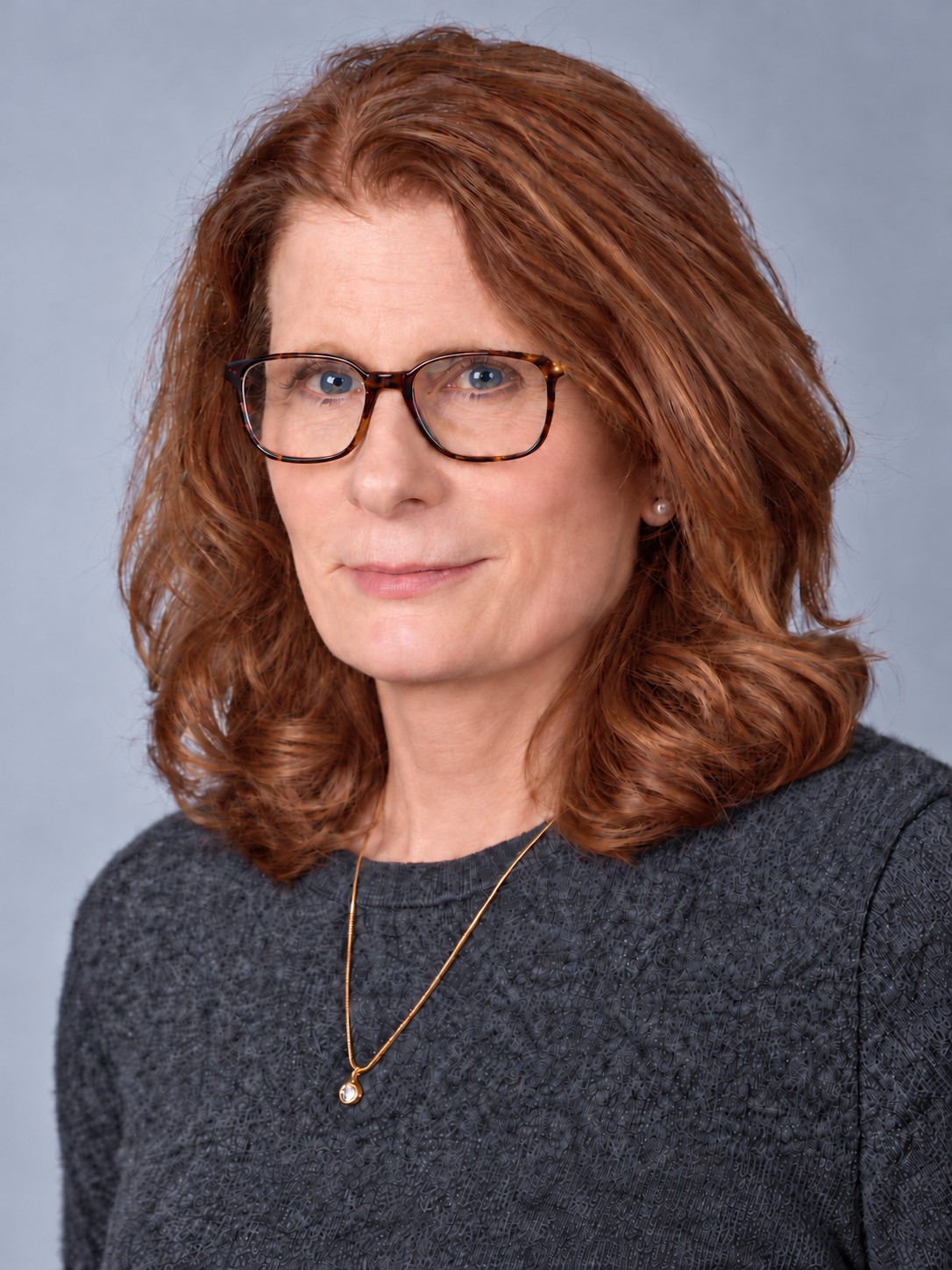
Leslie Hills
VTSU Professor, Department Chair of Health Professions, and Dental Hygiene Program Co-Coordinator
Please tell us a little bit about your background and what brought you to VTSU.
I’ve been teaching dental hygiene for over 30 years, and I still enjoy it. I was teaching full-time at UVM when the dental hygiene program closed in 2004. The program transitioned to Vermont Technical College, and now Vermont State University. It’s been quite a journey, and I’ve been lucky to work with some great people along the way.
These days, I’m a Professor, Department Chair of Health Professions, and Dental Hygiene Program Co-Coordinator. My roles have changed over the years, but the best part is still working with students. I love seeing how much they grow from the beginning of the program to graduation, especially when they start to realize what they’re capable of.
Are there any specific strategies you use to increase or maintain student motivation?
I try to make what we’re teaching feel relevant. When students can connect something from class to a patient they’ll be treating, it tends to click. I share examples from clinical practice and talk about why the details matter.
I also try to remember how much our students have on their plates. The program is demanding, and sometimes they need encouragement as much as they need instruction. I set high expectations, but I want students to feel comfortable asking questions and making mistakes while they’re learning. And a little humor helps. Sometimes pointing out how far they’ve already come is enough to keep them going.
What important lessons have you learned from VTSU students that have shaped you as a teacher?
Our students have taught me that there’s no one way to reach everyone. Something that makes perfect sense to one student might need a completely different explanation for another. I’ve learned to listen more, be flexible, and not assume that my first approach is always the best one.
I’ve also gained a lot of respect for what students manage outside of school. Many are working, raising families, or dealing with challenges we may never know about. Seeing their determination has made me more patient and more aware of how important a little understanding can be. I still learn things from my students every year.
Were there any professional development opportunities offered over the past year that you found to be particularly beneficial?
A highlight for me was attending the American Dental Education Association (ADEA) meeting in Minneapolis in June. I always enjoy talking with other dental educators, hearing what they’re trying in their programs, and coming home with a few ideas of my own.
A big part of this year has been spent writing our program’s self-study in preparation for the Commission on Dental Accreditation (CODA) site visit in mid-November. Professor Heather Blair, our Dental Hygiene Program Co-Coordinator, and I have worked closely together on it, with invaluable help from Professors Judy Schmidt and Ryan Pepper, our full-time faculty. It’s been a huge amount of work, but it’s also made us take a good, honest look at our program—what’s working well and what we can improve. I’m really grateful for the team we have.
I’ve also been part of the Watermark Program Review and Continuous Improvement Process (PreCIP) pilot. That’s given me another chance to think about how we assess student learning and use what we find to make changes. Between all of these experiences, I’ve had plenty to learn this year!
Is there any advice you would share with first-year instructors based on your own experiences in previous years?
I’d say don’t expect yourself to have it all figured out right away. I’ve been teaching a long time, and I still walk out of some classes thinking, ‘Well, I’ll do that differently next time.’ That’s part of teaching.
Get to know your students, be clear about your expectations, and let them see that you’re a real person. You can be supportive and still hold them accountable. And don’t be afraid to ask your colleagues for help. Some of the best things I’ve learned about teaching have come from conversations with other faculty.
Most of all, try to enjoy it. There will be stressful days, but there are also those moments when something finally clicks for a student, or when a graduate comes back to tell you how they’re doing. Those moments really do make it worth it.
Teaching Effectiveness Certificate
The Teaching Effectiveness Certificate Program is a voluntary professional development opportunity that provides recognition to instructors invested in growing their teaching practice. The certificate program provides a structure to engage in developing teaching effectiveness through implementation, self-reflection, and growth, grounded in the evidence-based teaching practices of the Teaching Effectiveness Framework (TEF).
Each year, the CTLI will offer a “depth” approach for a single domain. For 2026-27, the Teaching Effectiveness Certificate will be offered in the Student Motivation domain. Instructors will have opportunities to earn Domain Experience Units (DEUs) by:
- Participating in a professional development experience.
- Implementing a teaching change based on what they learned.
- Evaluating and reflecting on the impact of that change.
- Submitting a summary of the learning, efforts, and impact on student learning for approval; submissions will be evaluated against the Rubric for Post Implementation Reflection.
Any instructor who earns ten DEUs in the 2026-27 academic year will receive the Student Motivation Teaching Effectiveness Certificate.
Learn more on the Teaching Effectiveness Certificate webpage.
Teaching Squares
About Teaching Squares
A teaching square is a group of four instructors who agree to observe each other during a semester, using an agreed upon set of observation norms. It is designed to be a non-evaluative, supportive, and growth-based process. Participants set at least one personal teaching goal and then observe others before reflecting on their own practice.
Benefits of Joining a Teaching Square
In addition to reflecting on their own teaching practices, participants benefit from making connections with colleagues, sharing ideas, reigniting their passion for teaching, and having time set aside to discuss best instructional practices with supportive peers.
Teaching Square participants have the opportunity to earn Domain Experience Units (DEUs), which contribute toward earning a Teaching Effectiveness Certificate in the domain selected for that academic year.
How to Learn More and Sign Up
Learn more about the group process and how to sign up on the Teaching Squares Program webpage.
Staying in the Loop Series
The CTLI and several campus partners are collaborating to deliver a series of 9 information sessions for faculty in the Fall 2026 semester.
While you are welcome to attend all 6 of the remaining sessions, we also invite faculty to come to some of the sessions based on interest in the topic or schedule availability. These are all 45-minute, Monday lunchtime sessions (from 12:15pm-1pm EST).
- November 2: Office of Culture and Institutional Excellence
- November 9: ROAD to Success
- November 16: Multilingual Student Services
Sign up now for all sessions that interest you!
Academic Support and Educational Opportunity Programs
As a Complete College America (CCA) Accelerator institution, we have an opportunity to share professional development programming offered by their organization. Below is an upcoming workshop series that may be of interest to members of the VTSU faculty.
Syllabus to Skill: A Fast-Track Lab for Embedding Micro-Credentials Virtual Workshop
Syllabus to Skill is a two-hour working session where faculty embed an industry-recognized micro-credential directly into an existing course. This is not a lecture or planning meeting — participants arrive with a syllabus and leave with a revised version ready to launch. Led by Dr. Jennifer T. Edwards, Professor and Former University Administrator, the two-hour working session provides a step-by-step framework faculty can reuse across courses and departments.
AUDIENCE
Faculty, Department Chairs, and Curriculum Designers
GOALS
Select a micro-credential that fits the course’s learning outcomes • Identify the specific assignment that serves as the basis for earning the credential • Leave with a repeatable process for embedding micro-credentials in other courses.
DELIVERABLES
Each participant leaves with a complete Foundation Kit:
- Revised syllabus with a micro-credential embedded
- Making Courses Career-Ready Worksheet
- Student-facing talking points and LMS announcement template
- Academic and Career Maps for Majors
- Plug-and-Play Micro-Credentials Map
- Micro-Credentials Menu and free credential options by college
HOW THE TWO HOURS WORK
- The Why – Career data and credential options that make the case for your discipline
- The Work – Select a credential, identify the right assignment to anchor it, and revise your syllabus
- The Map – See how credentials fit into a full degree pathway, plus Q&A
WORKSHOP DATES
Sign up for one of the below sessions.
- Nov 10, 2026 from 1:00-3:00PM (CDT)
- Dec 16, 2026 from 1:00-3:00pm (CDT)
Building Anti-Racist Educators: Reading & Inquiry Series
This Reading and Inquiry Series provides a monthly set of tools for learning, introspection and having conversations about issues of racism in our university, classrooms and communities. We hope that through regular reflection and conversation, you can get better at recognizing and resisting your biases and the impact they have on your students and colleagues.
Meetings Dates & Times
The group will meet for 60 minutes once per month when classes are in session, beginning in September. A survey will be sent to all those who express interest to identify a day of week and time that works for the majority.
How to Sign Up
To receive a calendar invitation, Zoom link, and access to the group’s Canvas space, please fill out the Vermont State Colleges Building Anti-Racist Educators Sign-Up Form.
Online Learning Consortium
All VTSU faculty who are involved with, or who would like to learn more about online or hybrid learning are invited to take advantage of the VTSU Membership with the Online Learning Consortium.
What is the Online Learning Consortium (OLC)?
OLC is a vibrant community dedicated to advancing quality online, blended, and digital learning in higher education. Founded in 1999 as the Sloan Consortium, OLC has been at the forefront of online education for over two decades. It brings together diverse professionals, including faculty, administrators, and instructional designers, offering extensive resources, original research, and professional development opportunities. OLC also provides quality standards tools to help institutions and faculty enhance their online programs.
How do VTSU faculty access the VTSU institutional membership?
Go to My Online Learning Consortium and click on “Create an Account.” Please use your @vermontstate.edu or @vsc.edu email address as your username, which will create the affiliation with the institutional membership. OLC has several newsletter groups you can opt-in to when creating your profile. If you choose to only opt-in to one newsletter, choose OLC Today. This newsletter covers noteworthy content as well as updates across OLC. This newsletter is sent every Tuesday.
What are the free benefits and opportunities for faculty?
All OLC webinars are free with institutional membership. These tend to last one-hour. In addition to upcoming webinars, many recent ones are available through the “on demand” option.
The peer-reviewed journal Online Learning is published quarterly and is dedicated to the development and dissemination of new knowledge at the intersection of pedagogy, emerging technology, policy, and practice in online environments
What additional professional development opportunities exist through OLC?
OLC’s highly regarded Online Teaching Certificate Program is discounted for institutional members. Leading from the conceptual to the implementation of online learning best practices, the Certificate is offered as a sequence of one foundation course, followed by elective courses and creation or revision of an online course under the guidance of a mentor. At the end of this program, participants will be prepared to design and develop a complete online or blended course based on current research and best practices.
OLC offers discounted workshops geared to faculty on a range of topics from artificial intelligence to trauma-informed pedagogy.
OLC sponsors two annual conferences: Innovate (spring) and Accelerate (fall). Innovate focuses on driving innovation in the realm of online, digital, and blended learning while Accelerate shares research and best practice related to these topics.
Upcoming Workshops
Note: All upcoming events can be viewed on the CTLI Events calendar. See below for the next 10 sessions.
- November 2 @ 12:15 pm – 1:00 pm
Staying in the Loop Series – The Office of Culture and Institutional Excellence
- November 3 @ 12:00 pm – 1:00 pm
Collaborative Learning: Increasing Student Motivation and Engagement Through Peer Instruction
- November 9 @ 12:15 pm – 1:00 pm
Staying in the Loop Series – ROAD to Success
- November 12 @ 4:00 pm – 5:00 pm
Providing Choices: Impact on Student Motivation and Engagement
- November 16 @ 12:15 pm – 1:00 pm
Staying in the Loop Series – Multilingual Student Services
- November 17 @ 10:00 am – 11:00 am
Collaborative Learning: Increasing Student Motivation and Engagement Through Peer Instruction
- November 30 @ 12:15 pm – 1:00 pm
Staying in the Loop Series – McNair Scholars Program
- December 2 @ 2:00 pm – 3:00 pm
Motivating Online Students: Practical Strategies for a One-Hour Course Tune-Up
Analyzing Direct Evidence
What are Direct Measures of Student Learning?
Direct measures encompass work produced by students that is tangible, visible, and measurable. Typically, direct measures demonstrate students’ learning related to knowledge and skills. Examples of direct measures of student learning include:
- Capstone projects and student portfolios evaluated using a rubric
- Research projects evaluated using a rubric
- Major papers evaluated using a rubric
- Juried performance evaluations
- Internship supervisor ratings of student performance
- Comprehensive examinations
- Pre- and post-test measures
- Proficiency exams
- Performance in licensure exams
- National or standardized exam scores
Direct measures of student learning may occur in a class (such as projects, papers, performances, exams), or they may result from an applied learning experience (such as an internship), or they may be an activity students engage in through an outside organization (such as a licensure exam).
Analysis Methods
There are both quantitative and qualitative methods for analyzing the direct evidence that is collected. Some programs may choose a combination of both methods when engaging in program assessment, depending on the types of evidence of student learning being evaluated.
Quantitative Methods
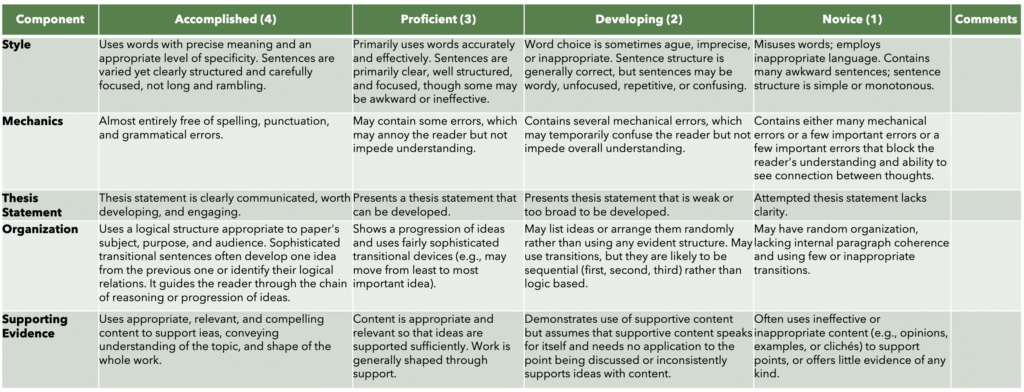
Analytic Rubrics:
An analytic rubric is the most commonly used and recommended method for analyzing direct evidence. An analytic rubric has categories and levels, with descriptive text for each component. Analytic rubrics developed from a Program Learning Outcome can be applied to artifacts of student learning from a variety of courses and a variety of assignments. For instance, if you expect to introduce a particular Program Learning Outcome in an introductory course, when you apply the rubric to student artifacts of learning from that course, you’d expect the rubric to reflect student learning in the “novice” and “developing” areas. When you apply that same rubric to an Intermediate-level class, if you notice that students haven’t moved beyond ”developing” into “proficient,” (perhaps the analysis shows an insignificant change from the introductory course), then you have found an area to make some changes. Or when you apply that same rubric to a Capstone where students are demonstrating mastery of that Program Learning Outcome, you find student learning reflects the “proficient” and “accomplished” areas, which is a validation of their growth. Analytic rubrics can be applied to a variety of artifacts of student work, including papers, projects, presentations, juried performances, portfolios, and more. Analytic rubrics can be applied to work produced by individual students, with the data aggregated and analyzed as a whole looking at frequencies, trends, and patterns.
Analytic rubrics (example, below) are the gold standard for quantitative assessment of direct measures. Sometimes an analytic rubric can be developed for two functions: grading and assessment. When this occurs, it is considered an “embedded assessment.” It is most common, however, for grading rubrics and assessment rubrics to be distinct, because grading is often tailored to the assignment with a different focus than program assessment.
Exam Result Analysis:
Completion scores are sometimes the only data programs have from certification/licensure/national exams. With evidence that one or more program outcomes are mapped to the exam, overall scores for completion can be one measure of student mastery of program learning outcomes. Comparisons can sometimes be made to peer institutions.
Accuracy scores can be used if students have taken an exam and questions are coded against the program outcomes or components of a program outcome. Evaluating the frequency of students who provided an accurate response on relevant questions compared with those who didn’t can be a quantitative approach to analyzing direct evidence. Not all questions will necessarily tie to Program Outcomes, so it is important to isolate the relevant questions.
Item analysis is also used with an exam, with questions mapped to outcomes. The questions may also be tagged by level of complexity (for instance, using Bloom’s taxonomy – remember, understand, apply, analyze, evaluate, create). Statistical analysis of student success with questions can reveal opportunities for greater emphasis in the curriculum. Not all questions will necessarily tie to Program Outcomes, so it is important to isolate the relevant questions.
Qualitative Methods
Qualitative Rubrics & Summaries
A qualitative rubric lists outcomes with a brief description of the highest level of performance for each outcomes with no ratings. Reviewers then comment on the student’s performance against the standard. While the individual rubrics can be returned to students as feedback, to be used for program assessment, the reviewer then creates an overall summary and analysis of the comments provided to students in the class, along with any observations or conclusions the instructor is drawing from them.
Coded Document Review & Themes
Documents created by students (such as projects or portfolios) can be coded, using pre-set or inductively generated lists of recurring themes. Software such as NVivo facilitates this process. However, tagging documents in Word (with comments) and tracking details in Excel is also acceptable. Analyzing the whole set of data is important to identify patterns and broader categories. Analysis should be captured in descriptive summaries by the reviewer(s). Be careful when interpreting counts of comments, as frequency may not equate to importance. Tables can be used to show connections between themes within categories.
Strengths & Weaknesses Trait Analyses
Trait analysis is another approach to analyzing student work. The reviewer makes a list of traits, for each student, as strengths and weaknesses related to a program learning outcome. The list is then analyzed for successes and opportunities related to student achievement of that outcome. The trait lists and conclusions are submitted as assessment data.
Observation Notes & Summaries
For an outcome related to students working with others (such as teamwork or client interactions), observation notes may be the most effective approach to gathering assessment data. A reviewer (often the instructor) deliberately and systematically observes each student or student group, taking detailed notes about behaviors, attitudes, and evidence of applied knowledge. A summary and analysis of these observations noting apparent successes or concerns is written and submitted as assessment data.
AI for Multilingual Students
Dr. Mary Dinh, Associate Director of VTSU Multilingual Student Services
As I was writing this update for the Center for Teaching & Learning Innovation, a multilingual learner came to my office and told me that her assignment had been reported for a suspected academic integrity violation.
“I did it! All by myself! I just used Grammarly to check my grammar.”
“Did you keep all your drafts and the editing history for this assignment?” I asked.
“Luckily, I did! Still, my anxiety in the class became overwhelming because the professor did not trust me.”
I asked which tool her professor had used to check her work for AI use. She told me that her professor had used Google. I explored Google’s AI Mode as a way of assessing authorship and found that its responses were inconsistent. When I submitted her flagged, two-page short-answer assignment, the response indicated that it was human-written. I also tried several commercially available AI detectors, including Pangram, Turnitin or GPTZero, and received differing results. These inconsistent results illustrated the risks of relying on automated judgments. This experience echoes the concerns raised by Giray et al. (2026): AI writing detectors infer authorship from patterns in a text, yet those patterns cannot reliably establish who wrote it or how it was produced. Their judgments may also vary depending on the genre, context, and linguistic characteristics of the writing. Faculty therefore need to exercise particular care when interpreting detector results and communicate clearly about whether and how these tools will be used to review students’ work.
The authors also discuss the harm that can occur when AI detectors are used to substantiate a disproportion of suspicions placed on multilingual students. Drawing on research including Liang et al. (2023), they explain that predictable vocabulary and simpler grammatical structures can cause authentic second-language writing to be misclassified as AI-generated. Students may consequently receive a contradictory message: improve your writing, but avoid making it look too polished or predictable. Furthermore, a false accusation may require any student, not only a multilingual learner, to spend substantial time defending work they actually wrote. Even when cleared, students may experience anxiety, humiliation, and reduced confidence in their instructors or institution.
This incident, although fortunately resolved, illustrates the value of an explicit AI policy in the syllabus over unspoken assumptions about acceptable use. The situation might have unfolded differently if the professor had clearly addressed both the ways multilingual students may use AI and the course’s AI policy in their assessment expectations. Making these expectations explicit in the syllabus gives students opportunities to ask questions and understand the boundaries: Can AI serve as a language tutor, an editing tool, an English grammar checker tool, or an information-gathering resource? Is it prohibited at particular stages, or at every stage of brainstorming and drafting, of a take-home writing assignment?
Indeed, research has documented the varied ways multilingual students use AI for language support. In our study, Nguyen et al. (2025), we found that multilingual students used AI to organize ideas, explore alternative expressions, improve linguistic accuracy, and adapt their writing to particular genres and audiences. They also selected tools to combine writing with images, audio, and video in projects connected to their future careers. These practices illustrate how AI can help multilingual students express subject-matter knowledge in English while navigating unfamiliar vocabulary, phrasing, and rhetorical conventions. The image below summarizes these strategies. Used thoughtfully, AI may provide immediate, individualized support between tutoring sessions, complementing the work of instructors and tutors.
Table 1
How Students Use AI in Career ESL Writing
How students used AI |
What this involved |
|---|---|
|
Developing and organizing ideas |
Using AI-generated outlines as starting points, then adapting them to their teaching context and personal voice. |
|
Evaluating structure and coherence |
Asking AI to examine draft organization and how clearly ideas connected. |
|
Improving language |
Reviewing suggestions for vocabulary, spelling, grammar, punctuation, and sentence construction. |
|
Comparing alternative expressions |
Exploring different phrasings and considering whether they sounded clear, natural, formal, or casual. |
|
Learning genre conventions |
Comparing AI suggestions with the structure and purpose of the required text and with teacher-provided models. |
|
Experimenting with prompts |
Revising questions and instructions to obtain more relevant help with explaining teaching responsibilities and professional goals. |
|
Creating multimodal projects |
Combining text, images, layout, video, and voiceovers using tools such as ChatGPT, Grammarly, Canva, Invideo, and Murf.ia. |
|
Checking and personalizing outputs |
Revising suggestions to reflect their own understanding and seeking feedback from teachers and peers. |
Note. This table summarizes strategies reported in Nguyen et al. (2025); it is not a reproduction of a table from the article.
Nguyen, L. T. H., Dinh, H., Dao, T. B. N., & Tran, N. G. (2025). Teachers’ perceptions and students’ strategies in using AI-mediated informal digital learning for career ESL writing. Education Sciences, 15(10), Article 1414. https://doi.org/10.3390/eduscci15101414
With the table above, I hope to share some understanding about how multilingual students may use AI at different stages of learning to help faculty develop more specific policies. A professor can identify the stages at which students must work independently to demonstrate their own reasoning, writing skills, or ability to express ideas in English language. Specifically, policies should specify whether students may use tools to correct spelling, grammar, and punctuation, suggest word choices, or make more substantial revisions or translations. At other stages, the professor may permit clearly defined forms of assistance that support the assignment’s learning goals.
Maphoto et al. (2026) also recommend combining early conversations with students, alongside with early drafts, revision logs, reflective commentaries, and brief oral explanations to understand their writing processes. Clear expectations about permitted AI assistance and disclosure are essential. Faculty should also explain whether they use AI detectors, which specific AI detectors, and how they interpret the results.
In the case described above, one possibility was that the student had used Grammarly’s AI-powered rewriting features beyond basic grammar correction. Such features can substantially reshape phrasing, which may exceed an instructor’s permitted level of assistance. However, a detector result alone cannot establish which features a student used or the extent of that use. Reviewing the student’s drafts and editing history, alongside a conversation about her process, provides a more meaningful basis for understanding what happened. This distinction reinforces the need to explain what “using Grammarly” means within a particular course, rather than assuming that students and faculty share the same understanding.
To help faculty members facilitate such conversations about AI use with multilingual students, I established the following statements on our internal homepage:
“Multilingual Student Services does not grant blanket permission to use AI or translation tools. Students must follow each instructor’s directions based on the purpose of the assignment. Unless explicitly permitted, students may not use AI to generate ideas, paraphrase sources, rewrite sentences, or translate complete assignments. Approved tools may be used only for limited language support, such as checking individual words, spelling, punctuation, or basic grammar.
Students should retain their original drafts, document revisions through Track Changes or version history, and disclose the tools used when requested. Tutors and ESL specialists may guide students through revisions but may not compose, substantially rewrite, or translate graded work on their behalf. The course instructor has final authority over all permitted tools and forms of assistance.”
If you have questions or inquiries regarding a specific case of a multilingual student’s use of AI, please contact me at Mary.Dinh@VermontState.edu. I am so happy to assist you! On Oct 27, 2026, I am invited to co-present about AI policy for multilingual learners at VTSU at NAFSA 2026 Region XI Conference with Dr. Lisa Koryushkina from Williams college (Williamstown, MA) on the topic of “AI, Academic Writing, and International Students: Emerging Practices and Expectations,” so I welcome any personal sharings and inputs if you have from your class.
References
Giray, L., Roe, J., & Diesta Espiritu, J. (2026). AI writing detectors are ineffective, unreliable and harmful. English Teaching: Practice & Critique, 1–17. https://doi.org/10.1108/ETPC-07-2025-0155
Maphoto, K. B., Giray, L., & Sevnarayan, K. (2026). Automated integrity or automated injustice? Turnitin’s AI detection in multilingual writing contexts. Assessing Writing, 69, Article 101086.
Nguyen, L. T. H., Dinh, H., Dao, T. B. N., & Tran, N. G. (2025). Teachers’ perceptions and students’ strategies in using AI-mediated informal digital learning for career ESL writing. Education Sciences, 15(10), Article 1414. https://doi.org/10.3390/educsci15101414

VSCS Libraries
Virtual Display
Election day is around the corner (November 3). Check out our 2026 Midterm Elections Topic Guide for any last-minute voting resources.
Featured Database of the Month
The Historical New York Times database provides access to New York Times articles dating back to 1851, including coverage of local and regional politics, world events, arts, and culture. It includes scanned images of the articles, so you see them in their original context, including article images and even historical advertisements.
The Historical New York Times is a great resource if you need primary sources for a research project or want to see the historical coverage of an important event or topic. Give it a try today!
You can find the Historical New York Times database by clicking on either Primary Sources or Newspapers in the More Source Types list under the search box on the homepage (or by searching for it on the Individual Databases tab of the search).
Need Help?
Contact the VSCS Libraries. Let us know how we can help!

Academic Support
Social Belonging for College Students
The Retention Tactical Team recently received approval to pilot an exciting new student success initiative at VTSU this spring. Social Belonging for College Students is a free, research-based intervention designed to strengthen students’ sense of belonging, academic engagement, and retention. The program helps students understand that challenges experienced during the transition to college are common, temporary, and manageable. Research has demonstrated positive impacts on student engagement, academic performance, and retention, particularly among students who may experience greater barriers to belonging.
Learn more about the initiative online and review the brochure for a helpful introduction to the program.
The intervention takes approximately 20 minutes to complete, and our goal is to have students who are new to VTSU participate early in their first semester. We are exploring opportunities to partner with faculty teaching CNX1 courses this spring to incorporate the intervention during the first day or week of class. We hope to make implementation as straightforward as possible for faculty while providing students with a meaningful opportunity to reflect on their transition to VTSU and their place within our university community.
Faculty teaching CNX1 this spring are eligible for a stipend through Title III and are encouraged to reach out to jennifer.jones@vermontstate.edu or 802-468-1315 to discuss the intervention.

The Rural Opportunity and Development (ROAD) to Success Program
Program Update
Hello Friends and Colleagues ~
I wanted to share some exciting news about a change in eligibility for the ROAD to Success program. I recently was informed that our eligibility no longer needs to require that students graduated from a rural Vermont high school as long as they attend a rural Vermont campus. Here is what this means:
- No matter where a student attended high school (in-state and out-of-state, rural or not) if they are enrolled as students at Lyndon, Johnson, Castleton or Randolph (our rural campuses) as full-time students in a Bachelor’s degree program, they are now eligible, PLUS;
- If they attend online and live in a rural Vermont community (anywhere EXCEPT Essex, Burlington, South Burlington, Williston, Winooski or Milton or outside of Vermont), they are now eligible, PLUS;
- If they attend Williston and live in a rural community and travel to campus (this includes Colchester/St. Mike’s campus, but excludes those other non-rural communities listed above and those commuting from outside of Vermont), they are now eligible!
Over the past 3 years, ROAD to Success funds have supported our students by:
- Paying $119K+ to students for unpaid internships, student teaching, research and professional development
- Helping 76 students with borrowed laptops, iPads, internet costs
- Upgrading 2 classrooms (Lyndon and Randolph) and 1 lecture hall (Johnson) with tech upgrades
- Funding Tutor.com online 24/7 tutoring program
- Participating in the work to increase Career Pathways from CCV to VTSU (as of 10/21/26 there are 51 Pathways)
- Supporting creation of online courses and certificates, including Navigating Ethical Scholarship at VTSU
- Sponsorship numerous rural community discussions that now include post-secondary education
- And providing a consistent Student Success Advisor, Sawyer Judkins, over VTSU undergraduate years
Please, if a student comes to you and is looking to borrow a laptop or iPad or needs funding for an internship, research, student teaching or professional development, please send them to the ROAD to Success webpage to review our information and apply to the program! They are also welcome to email Beth Walsh at beth.walsh@vermontstate.edu for additional information.
Please let us know if you have questions and share this information with others in your department.
Thank you,
Beth Walsh – Project Director
Bill Lucci – Assistant Director
Sawyer Judkins – ROAD Student Success Advisor
The McNair Scholars Program
Recruitment
The McNair Scholars Program is recruiting a new cohort of scholars! We are a federally funded TRIO program that provides eligible students with access to paid summer research internships and help with applying to graduate school.
We pay faculty members a stipend of $1700 for mentoring McNair Scholars on their research projects during the summer.
Please forward the names of students you think would be a great fit for the program, as well as any questions you may have, to Director, Dr. Debbie Warnock at debbiewarnock@vermontstate.edu.
Eligibility Requirements
- Be a U.S. citizen or permanent resident
- Be a VTSU undergraduate on the Castleton campus with sophomore or junior standing (or a senior who is willing to delay graduation until August)
- Have at least one summer remaining before graduation
- Have a cumulative GPA of 2.75 or higher
- Intend to pursue graduate school after graduation
- Be a low-income student AND a first-generation college student (neither parent/guardian has earned a Bachelor’s degree or higher)
The VSC IT Learning Technologies Team
For support with your instructional and classroom technology needs, please visit the VSC Learning Technologies SharePoint site.
Review the Learning Spaces section of the site to connect with VSC classroom technology staff, troubleshoot and report technical issues, and find equipment overviews, detailed technical guides, responses to frequently asked questions, classroom maintenance schedules, information about upcoming enhancements, and the types of support available across our campuses.
Access the Academic Applications section of the site for timely content and resources for Canvas, Zoom, Lumina (YuJa), Panorama, ReadSpeaker, Respondus, and other VSC educational tools. Site visitors that need additional 1:1 assistance can learn how to connect with team members, including Senior Instructional Technology Specialist Sean Dailey who hosts drop-in Zoom sessions throughout the year.
ReadSpeaker in Canvas: Dropdown Answers and Math
New guidance on the Academic Applications SharePoint page explains how students can use ReadSpeaker to hear dropdown answers and math expressions in Canvas:
- Dropdown answers: Before starting a quiz, open the ReadSpeaker player, select Settings, and turn on Form Reading to hear dropdown answer options.
- Math expressions: Right-click an equation in Canvas, select Math Settings > Math Renderer > HTML-CSS, then use ReadSpeaker to confirm it reads correctly. Students must repeat this setting after clearing browser data or switching browsers or devices. If an equation still isn’t read, it may not have been created with Canvas’s built-in math editor.
Please share the ReadSpeaker guidance on the Academic Applications SharePoint page with students who use text-to-speech.
For help from the VSC IT Learning Technologies Team, please submit a ServiceDesk ticket.